
Notification board
Tell the whole team once. Know who has read it.
Post an announcement and it appears on every dashboard it is meant for. Ask staff to confirm, and see at a glance who has.
Free for 30 days. The notification board is part of your plan.

The right message, to the right people.
Choose the type and priority, then who should see it: everyone, or only admins, managers, safeguarding leads or carers.
- General announcement
- Important reminder
- Urgent
- Training or event
- Celebration or good news
Pin to the top
Keep the most important notice above everything else.
Schedule it
Set a publish date and an expiry date, so old notices tidy themselves away.
Ask for confirmation
Staff tick to say they have read it. It shows as action required until they do.
Email it too
Send a copy to everyone it is meant for, for the notices that cannot wait.
Add a link
Point people to a policy, a form or a booking page with a button of your own.
On the dashboard
Notices appear in the dashboard widget, as well as on the board.
See who has read it, and who has not.
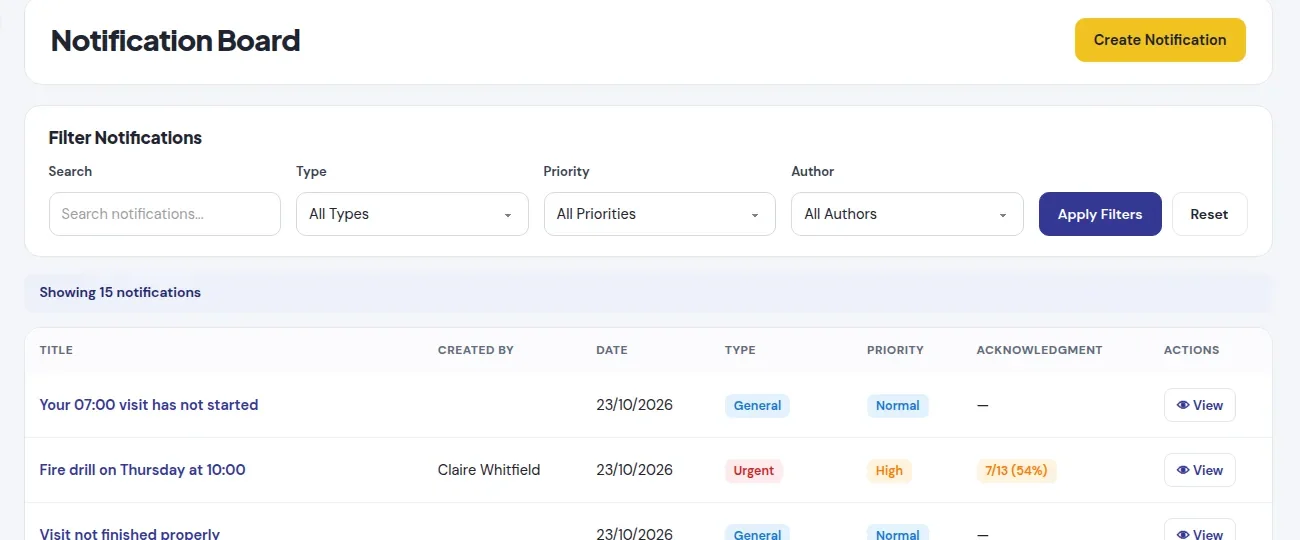
Every notice that needs confirming shows how many have read it, as a number and a percentage.
- Two lists side by side: who has confirmed and who is still pending.
- Each name shows their role, so you know who to chase.
- Useful evidence that staff were told about a change in policy or practice.

Written in a minute.
One short form: a title, the message, the type, the priority and who should see it. Every other option is optional.
- Admins, managers and safeguarding leads post notices. Carers read them.
- Edit a notice after posting if something changes.

Every notice in one place.
Search and filter the board by type, priority and author, with the confirmation rate beside each one.
Path sends the reminders for you.
Path, the assistant built into Care Pathway Pro, uses the same board to keep people on track.
Visits on time
A carer whose visit has not started gets a note of their own:
Your 14:00 visit has not started.
Shifts closed off
Forgot to sign out, or a visit not finished properly? Path tells the person, not the whole team.
Urgent team alerts
Ask Path to alert the team and it posts an urgent, pinned notice in your own words.
Stop chasing who saw the message.
Start a free trial and post your first notice today, or book a demo and we will walk you through a sample service.
- Each organisation only ever sees its own notices.
- Staff can look back through older notices any time.
- Path posts and reminds in plain words. Meet Path